


Dossier ENGIE
How to track your electricity consumption in real time
Tracking your electricity consumption in real time helps you better understand and manage your energy expenses. Discover how to do it with the right tools.

Tracking your electricity consumption in real time is essential to optimize your energy expenses and reduce your bill. But how can you monitor your consumption in real time, especially with ENGIE? And why can keeping an eye on your energy usage help you save money every day? ENGIE explains.
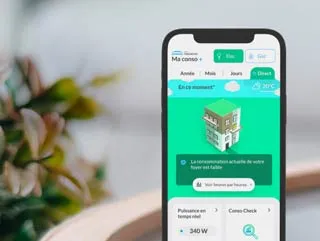
Découvrez les supers pouvoirs de Ma conso+
Passez à l’action pour réduire vos consommations d’électricité
Pour seulement 2,99€TTC / mois
How to track your electricity consumption from your Linky meter
Just five years ago, tracking your consumption mainly meant analysing your bills—with varying degrees of accuracy!
Since the rollout of the Linky smart meter, there’s no need for complex calculations based on average appliance usage. You can now check your consumption in real time directly from your meter and adjust your habits or equipment to save energy.
Good to know
The Linky meter, deployed by Enedis (France’s electricity distribution network operator), automatically transmits your consumption data in real time via a secure network. No technician is required for meter readings: you are billed based on actual usage and benefit from more accurate monitoring and tailored offers.
How to track your consumption in real time from your Linky meter
First of all, it’s important to note that the Linky meter does not directly display consumption variations, although it makes them much easier to calculate.
However, you can view your consumption index precisely and in real time directly on the meter.
In practical terms, the Linky meter allows you to perform your own readings and calculate the increase in consumption using a simple subtraction. You can even do this daily if you wish.
To find your consumption index, press the “+” button on your meter three times. A value in kWh will then appear on the screen.
The Linky meter light indicator: a practical signal
The Linky meter includes a light indicator located at the top of the device. The speed at which it flashes varies depending on your electricity consumption. The faster it flashes, the more electricity you are using.
Tracking your consumption with ENGIE
For even more simplicity and detailed insights, you can also track your consumption directly through your electricity supplier. ENGIE provides its customers with efficient monitoring tools.
Ma Conso and Mon Alerte: two services included with your ENGIE electricity offer to track your consumption
Directly linked to your offer, Ma Conso and Mon Alerte are two free services available to ENGIE customers.
They allow you to monitor and manage your consumption in kWh and euros, and to be notified if your usage exceeds expectations—especially if you are on a monthly payment plan.
To activate them, go to your Customer Area. You can access it from a computer or via the simple and intuitive ENGIE mobile app, available on the Apple App Store and Google Play Store.
There, you will find detailed meter readings displayed in your dashboards. At a glance, you can analyse consumption variations and easily build your consumption profile.
Good to know
The app also centralises all information related to your contract for simplified management.
At the same time, Mon Alerte notifies you (by SMS or email) of any unusual consumption peaks, helping you adjust your monthly payments or better manage your energy usage.
If you are unsure which electricity supplier to choose, these two features might help you decide!
Ma Conso+: an option to go further
To take your electricity monitoring further, ENGIE offers the Ma Conso+ option. This provides more detailed consumption data and additional features compared to standard tools.
For €2.99 per month, Ma Conso+ allows you to:
collect more detailed information about your consumption;
see where you stand in relation to your subscribed power;
view your electricity consumption instantly in real time;
access your data via the app;
measure the cost of consumption for specific appliances;
anticipate your usage to avoid exceeding limits and prevent higher electricity bills.
This option comes with no commitment and no cancellation fees.

Other solutions to track your electricity consumption
Other methods are compatible with a Linky meter to monitor and manage your consumption in real time.
Visit the Enedis website
Create your personal account on the Enedis website at mon-compte-client.enedis.fr. You can then view your electricity consumption directly from your dashboard.
Install the Enedis mobile app
Enedis has developed the “Enedis à mes côtés” app, available on the iPhone App Store and Google Play Store for Android devices.
Why track your electricity consumption in real time?
There are many advantages to monitoring your consumption with Linky:
- identifying the appliances that consume the most electricity;
- adjusting your subscribed power, for example after purchasing new equipment;
- improving overall energy management;
- saving energy through data analysis based on your actual needs;
- making your home more energy-efficient and environmentally friendly through better control of consumption.
However, one important clarification: simply knowing your consumption does not automatically reduce your energy costs. It is the actions and new habits you adopt thanks to this knowledge that make the difference.
Now that you have all the information, identify consumption peaks and adopt eco-friendly habits to reduce your usage:
- use low-consumption appliances;
- switch off devices on standby;
- carry out energy renovation work, especially insulation improvements;
- choose A+++ rated household appliances, etc.
Discover our room-by-room tips and reduce your energy expenses!
What other information can you find on your Linky meter?
In addition to your electricity consumption, you can access other information via the Linky meter interface, such as:
your contract power in kilovolt-amperes (kVA), also called apparent power;
your contract name and selected tariff option (Base, heures pleines/heures creuses – peak/off-peak hours in France);
the maximum power reached during the day;
the unique Point de Référence des Mesures (PRM), which identifies your connection point;
your meter’s serial number;
the MID index.
Find out how to read the information on your meter screen for quick and efficient access!
Good to know
Changing your power: a remote operation
Thanks to the Linky meter, no technician needs to visit your home to change your meter’s power. The operation is carried out remotely. It is billed by Enedis starting from the second year.
Real-time electricity consumption: key takeaways
Thanks to the Linky meter, you can track your electricity consumption in real time and adjust your habits to save energy.
Use the “+” and “-” buttons on the Linky meter to navigate the menu and press “+” three times to display your consumption in kWh.
ENGIE also offers the free Ma Conso and Mon Alerte services to help you monitor and manage your consumption directly from your Customer Area.
For even more detailed tracking, the Ma Conso+ option allows you to view your consumption in real time and measure the cost of each appliance.
Remember: understanding your consumption profile alone does not reduce your energy bill. Adopting new habits is what truly makes the difference.
To view your subscribed power directly on your Linky meter, press the “+” button three times. The power in kVA will appear on the screen. You can also find this information on your energy bills.
Get your consumption index by pressing the “+” button on your meter. For more detailed information, consult the websites or apps provided by ENGIE or Enedis, or use monitoring tools offered by your energy supplier.
To calculate the electricity consumption of your appliances, you can use a simple formula:
(number of hours the appliance is used) × (number of days used) × (power in watts) ÷ 1000.
An easier solution: with the Ma Conso+ option, you can directly access the electricity consumption of each appliance connected to your home.
A useful tip to identify energy-hungry appliances: plug in the device and observe the flashing speed of your Linky meter’s light indicator. If it increases significantly, the appliance is consuming a lot of energy.